System Design Prerequisites: Level 1 & 2
Welcome Back to my blog! If this is your first time here, Hello there! I hope you are doing well. After an week of reading 30+ blogs related to system design I decided to create an 4 blog series on this topic. Even tho system design is a vast topic, People jump directly on system design interviews without knowing the basics. So in this blog series I will try my best to cover most of topic and provide resources as well at the end. [Disclaimer: This wont be text heavy blog, but a lot of diagrams]
Level 1
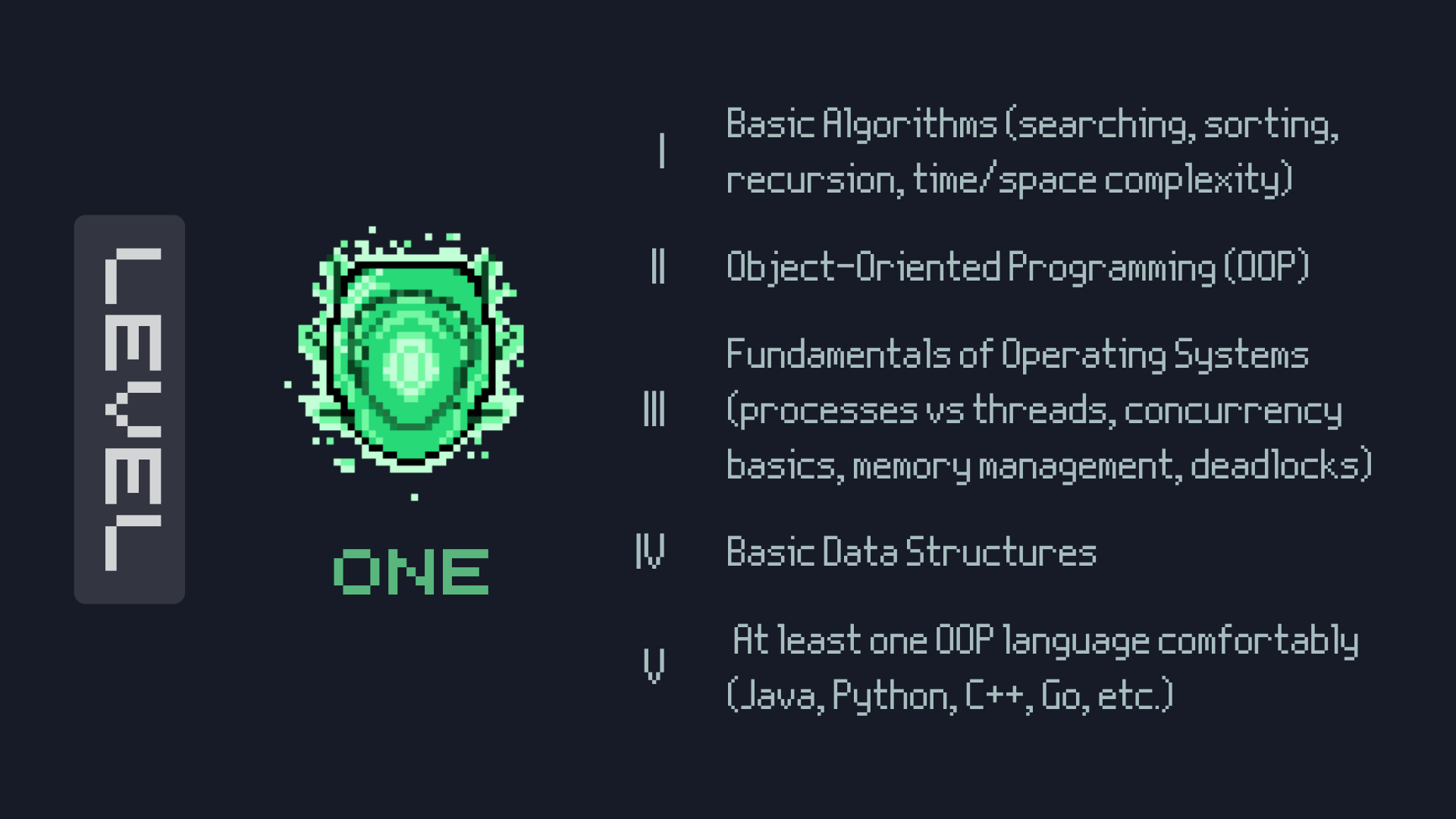
Learn Programming! Get comfortable with atleast one programming language! I am realizing now i messed up the order of level one so i describe it instead.
- Learn atleast one OOP language [I started with C++, Then went to python, then to Go].
- Basic Data structures like arrays, linked lists, stacks, queues, trees. Graphs I think should be studied slightly later.
- Basic Algorithms like sorting, searching, recursion, dynamic programming.
- OOPs Concepts like Encapsulation, Inheritance, Polymorphism, Abstraction.
- And finally Fundamentals of Operating Systems.
Most of these topics are covered in our basic circulum but we tend to ignore it. Could be teachers or the type of overwhelming syllabus of 1st and 2nd years. Lets start discussing 3 topics from level 1!
Computer Architecture and Application Architecture
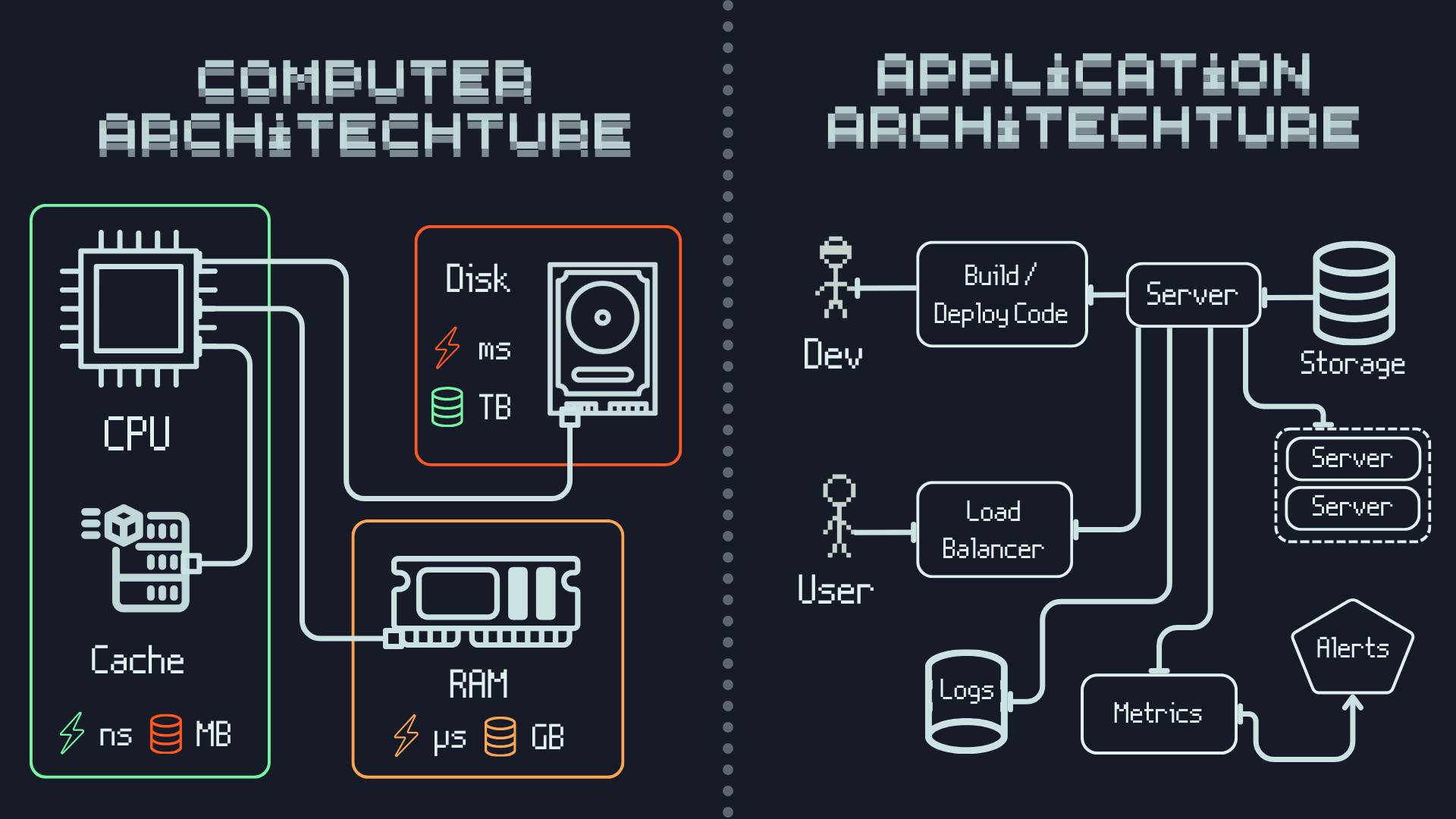
When we consider computer architecture in the terms of storage and speed, Cache, RAM and Disk have their own advantages and disadvantages
- Cache is the fastest but has the least storage capacity
- RAM is slower than cache but has more storage capacity
- Disk is the slowest but has the highest storage capacity
Similarly in application architecture we have different types of storages with different speeds and capacities
- In-Memory Databases (like Redis, Memcached) are the fastest but have limited storage capacity
- NoSQL Databases (like MongoDB, Cassandra) are slower than in-memory databases but offer more storage capacity and flexibility
- Relational Databases (like MySQL, PostgreSQL) are the slowest but provide robust data integrity and complex querying capabilities
Understanding these trade-offs is crucial for designing efficient systems that meet performance and scalability requirements.
Lets discuss about the basic application architecture flow as mentioned in the diagram above aswell,
- The Developer writes the code for the application i.e deployed in the server.
- The server is connected to an database for storing the data.
- The user (browser/mobile app) makes requests to the server to access the application.
- The server processes these requests, interacts with the database if necessary, and sends back the appropriate responses to the client.
- But wait! what if we have around more than one or les say 10000 users accessing the application at the same time? Thats where horizontal scaling[more servers], vertical scaling[better servers] and load balancers that determine which server should be allocated to the user
- What would happen if our app breaks apart? thats where we use logs to track the errors and fix them.
- Metrics from server like CPU usage, memory usage, disk I/O, network I/O etc would determine the performance of the application.
- Alerts are configured from metrics to notify developers of potential issues or performance bottlenecks before it happens.
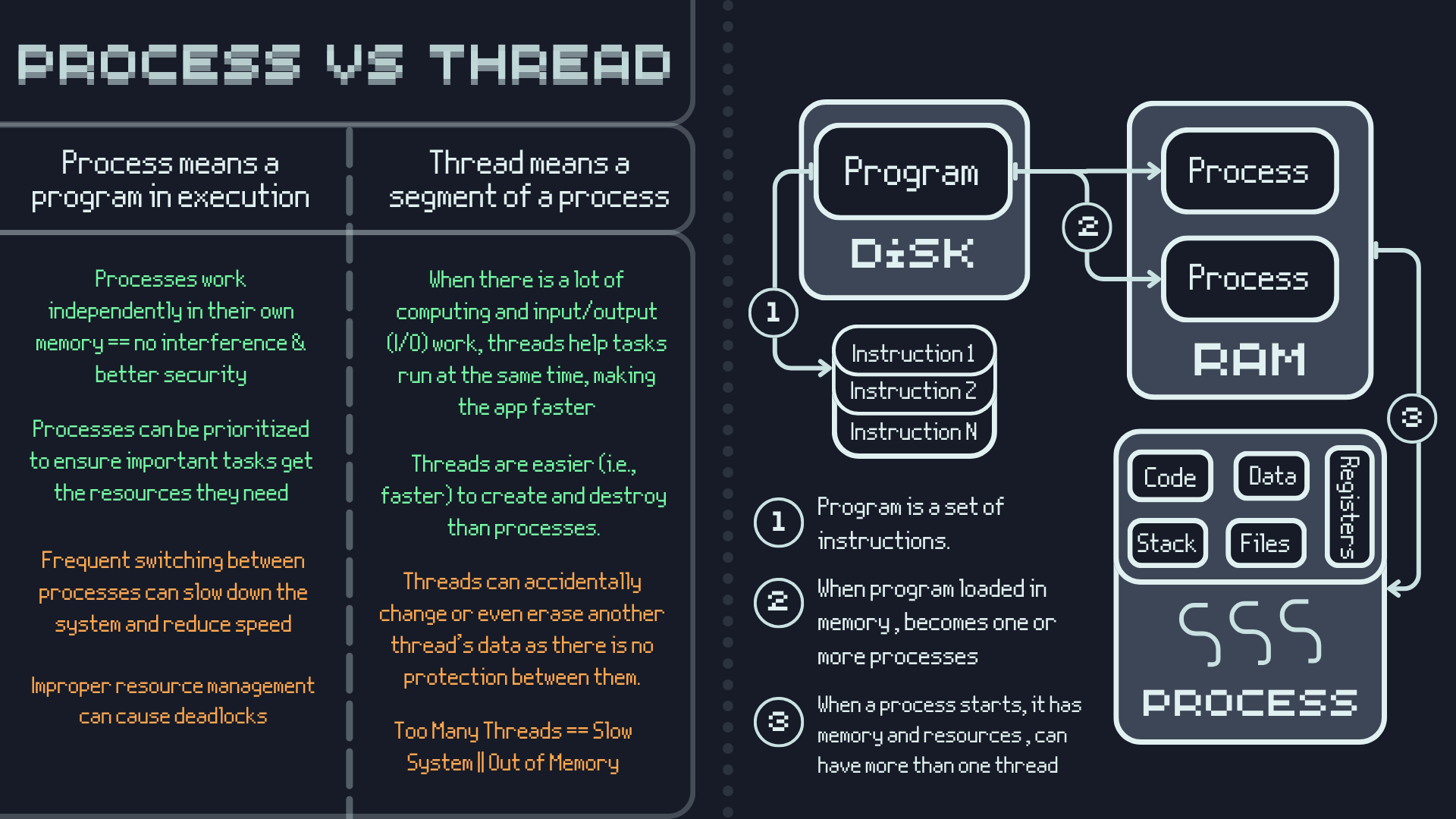
Process Vs Thread
What is Deadlock?
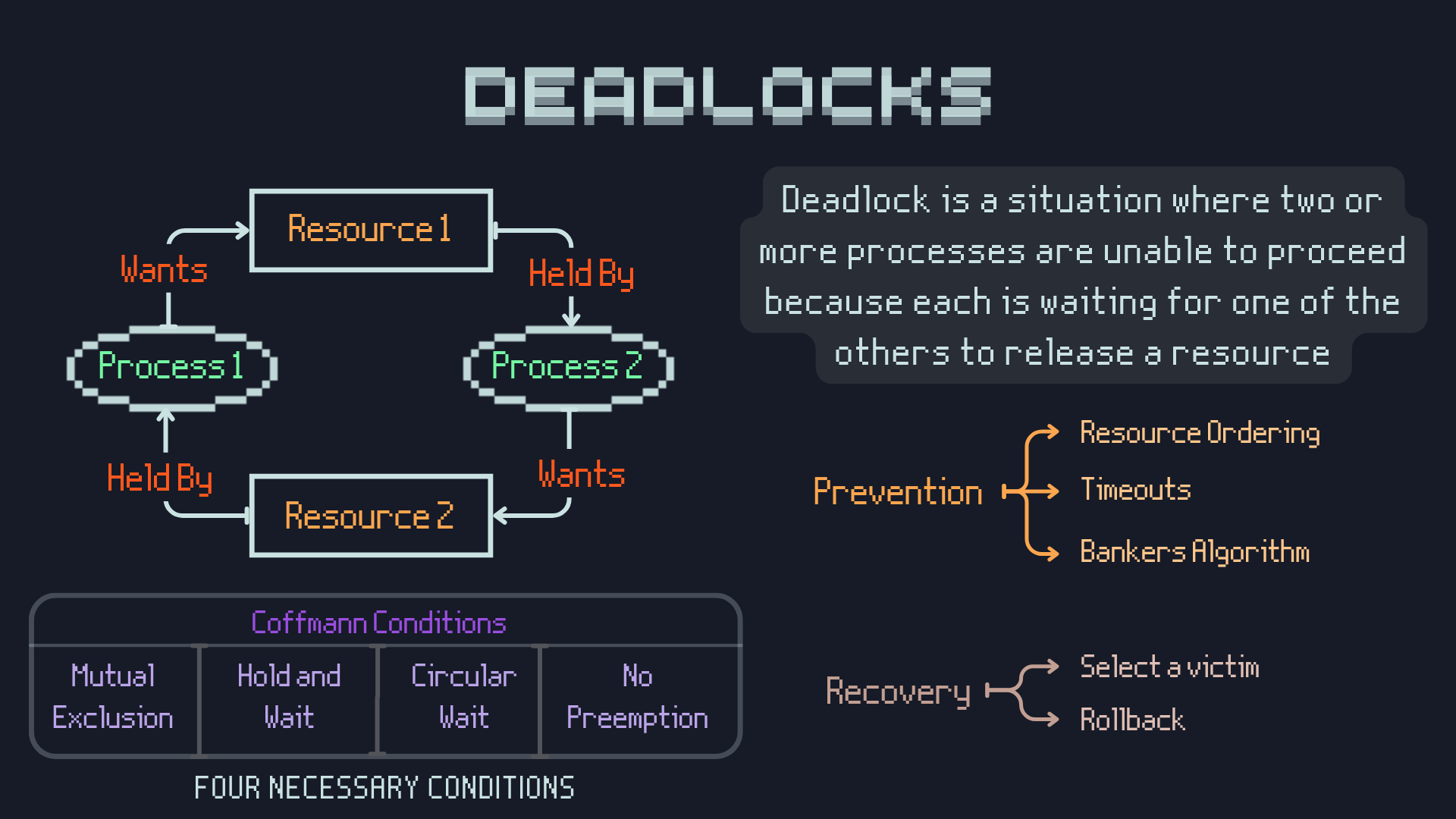
So what are the Four necessary Coffman Conditions for an Deadlock to occur?
- Mutual Exclusion: At least one resource must be held in a non-sharable mode. That is, if resource R is being used by a process P1, no other process can use R until P1 releases it.
- Hold and Wait: A process must be holding at least one resource and waiting for additional resources that are currently held by other processes.
- No Preemption: Resources cannot be forcibly taken away from a process while it is using them. They must be released voluntarily.
- Circular Wait: There must exist a circular chain of processes, where each process is waiting for a resource held by the next process in the chain.
We have rare occurances maybe none interactions with deadlocks really, because modern DBMS have complicated algorithms to prevent this to ever occur.
Level 2
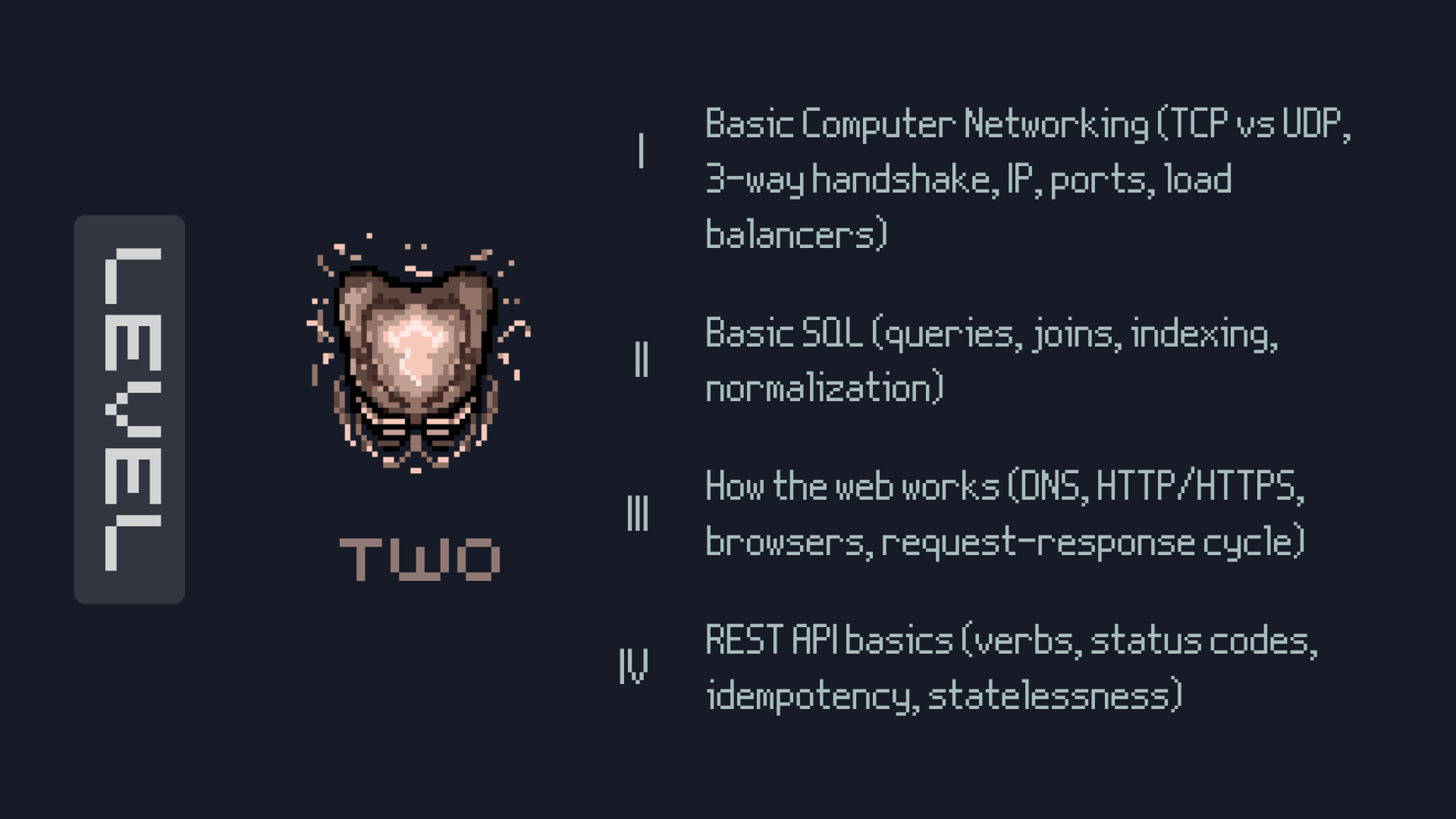
This is where you gain the knowledge of computer networking, how the web works, learning sql queries, and then learning about REST APIs would be beneficial [Not writing about REST APIs but I provide resources :)]. Ima mention few of the topics here itself.
What is DNS?
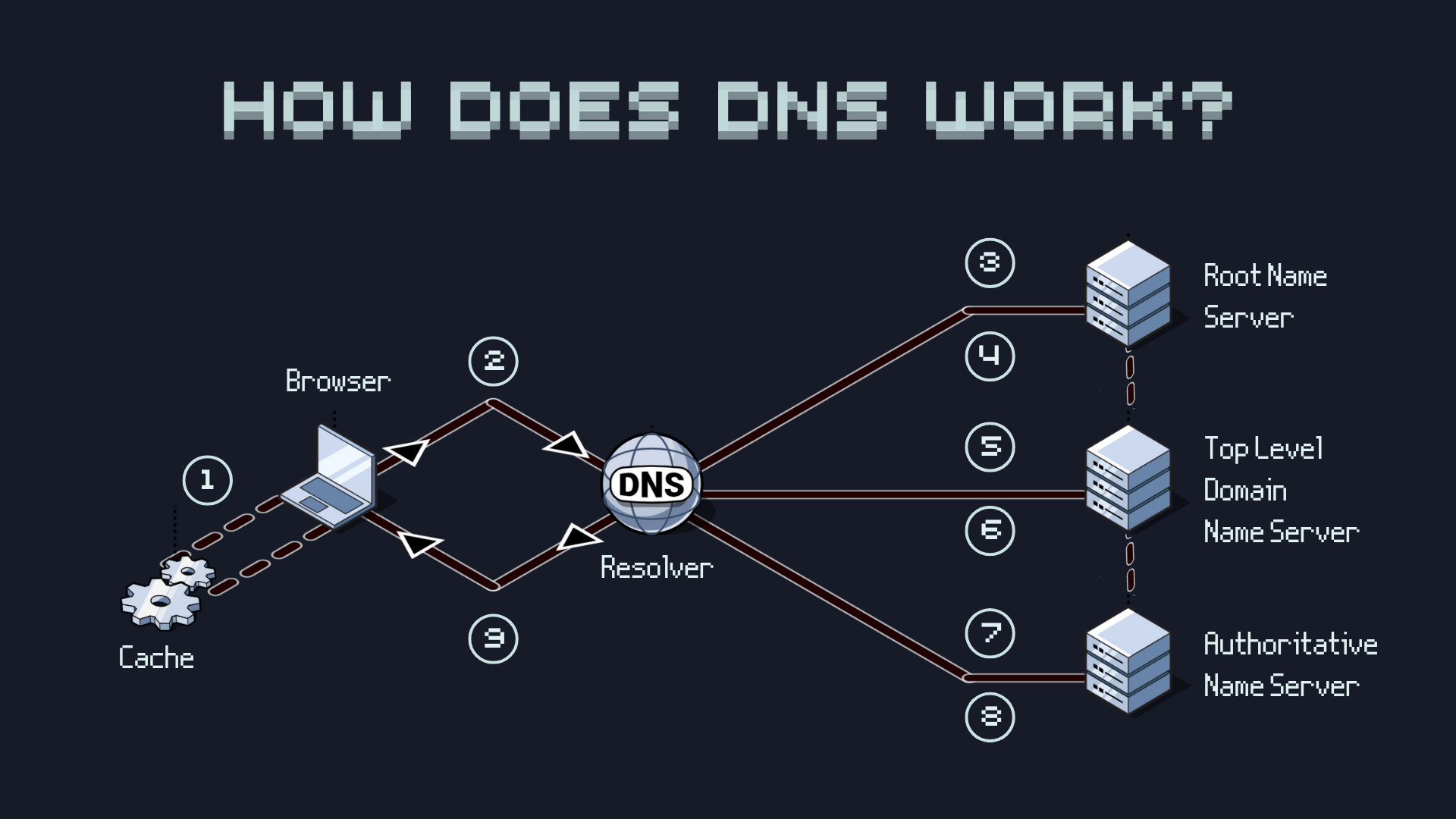
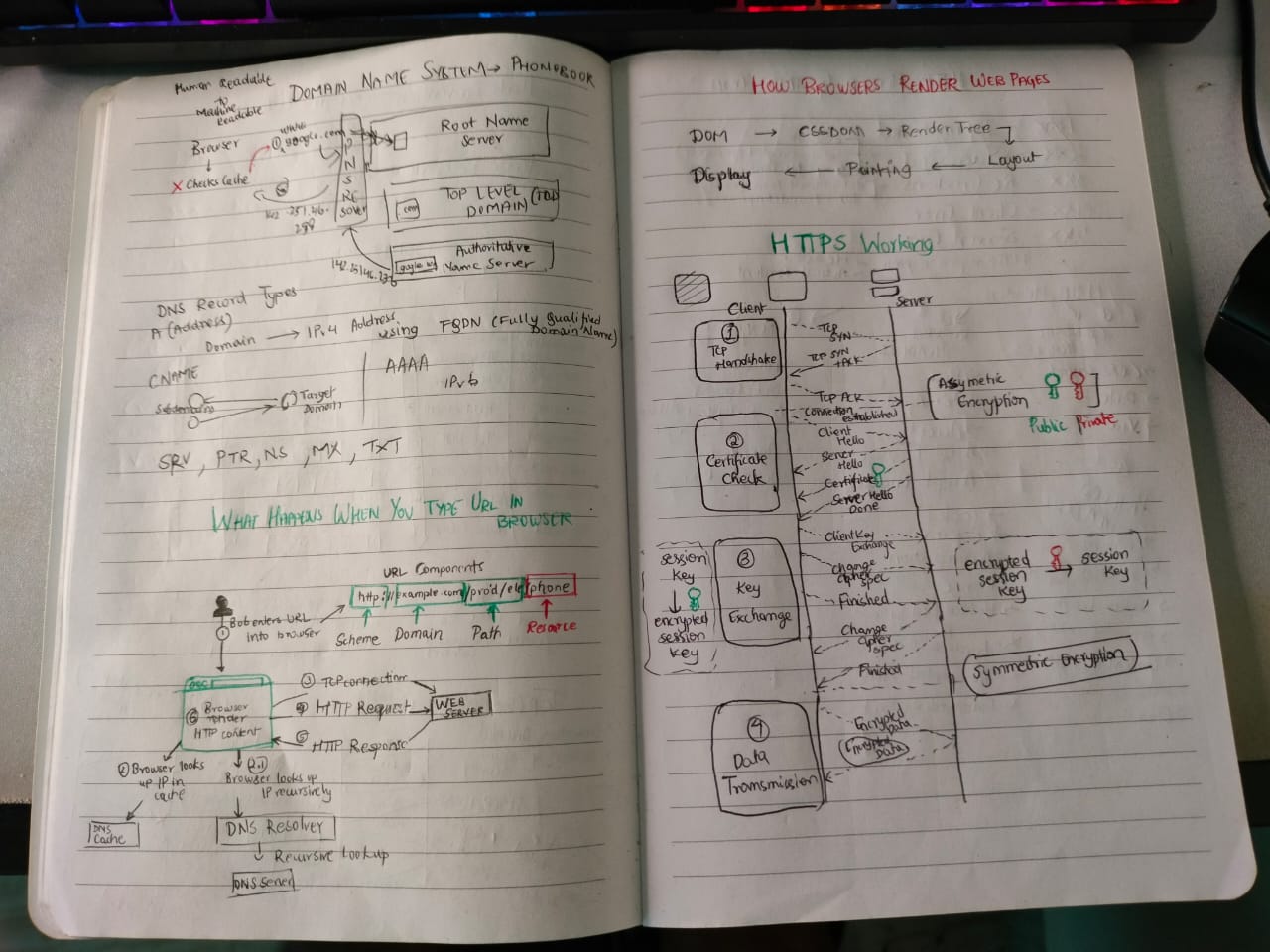
Domain Name System AKA Phonebook of our Internet, its main purpose is to translate human-readable domain names (like example.com) into IP addresses (like 192.0.2.1) that computers use to identify each other on the network.
- example.com is typed into the browser, browser checks its local DNS cache first.
- If not found, it queries the recursive DNS resolver provided by the ISP.
- The resolver queries a DNS root name server.
- The root server responds to the resolver with the address of a TLD DNS server (in this case, .com).
- The resolver then makes a request to the .com TLD.
- The TLD server responds with the IP address of the domain's name server, google.com (authoritative name server).
- The DNS resolver sends a query to the domain's nameserver.
- The IP address for google.com is then returned to the resolver from the nameserver.
- The DNS resolver responds to the web browser with the IP address (142.251.46.238) of the domain requested initially.
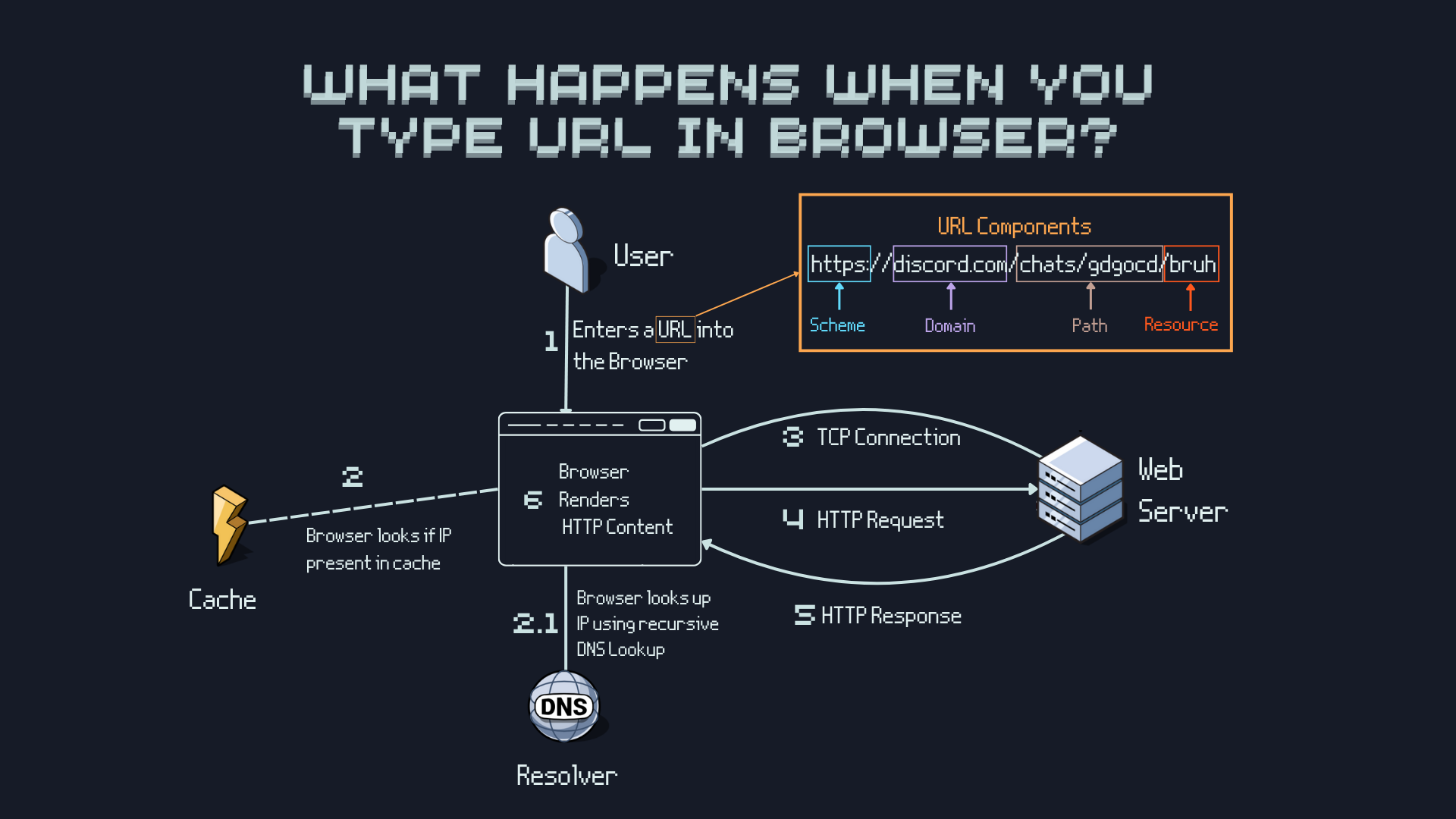
What Happens when you type a URL in the browser?
OSI Model
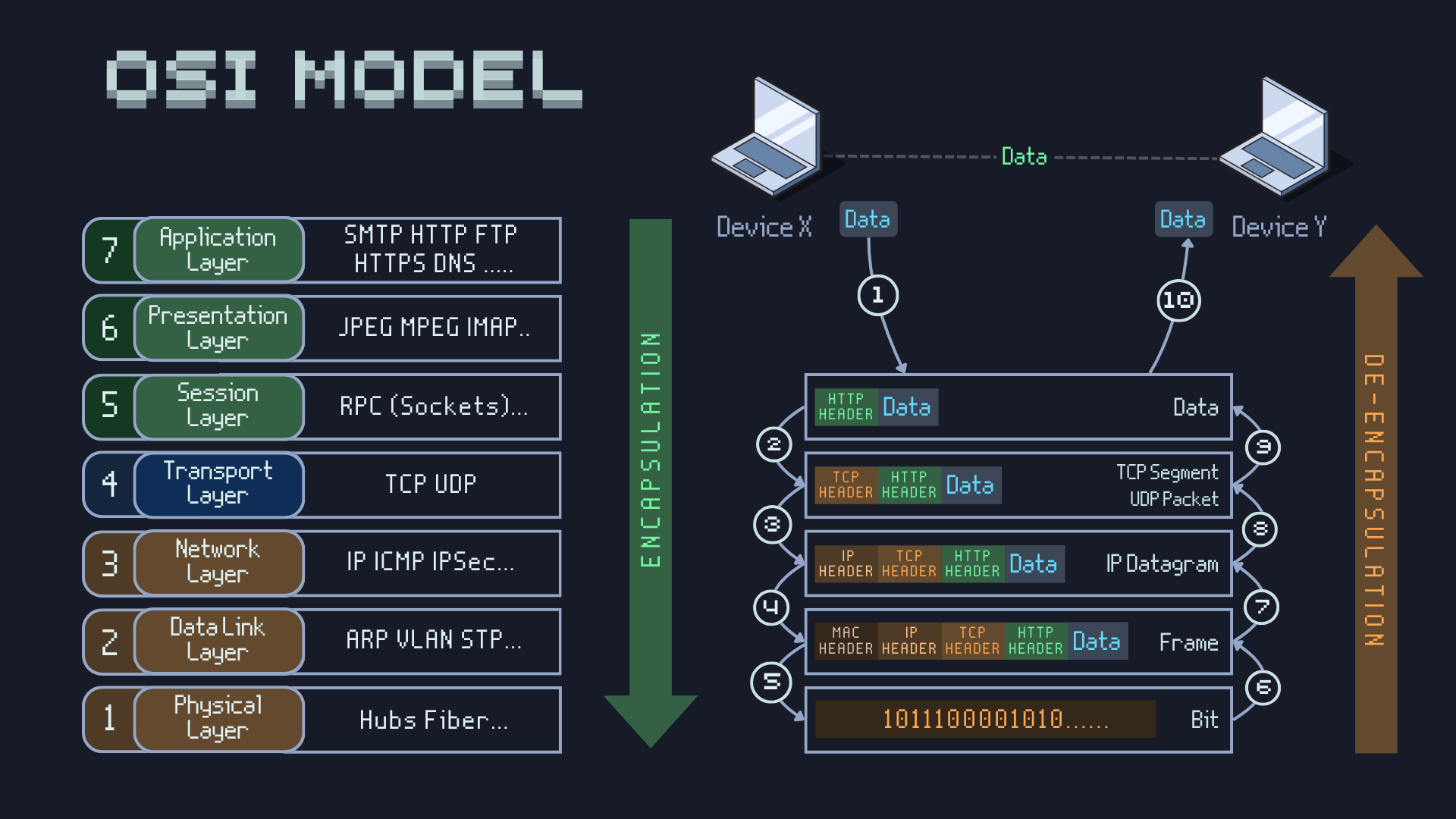
OSI Model is a conceptual framework that standardizes the functions of a communication system into seven layers. Each layer has specific responsibilities and interacts with the layers above and below it. The layers are:
- Physical Layer: Deals with the physical transmission of data bits over a communication medium.
- Data Link Layer: Provides error detection and correction, as well as frame synchronization.
- Network Layer: Handles routing of data packets across different networks.
- Transport Layer: Ensures reliable data transfer between applications.
- Session Layer: Establishes, manages, and terminates sessions between applications.
- Presentation Layer: Handles data translation, encryption, and compression.
- Application Layer: Provides network services directly to user applications.
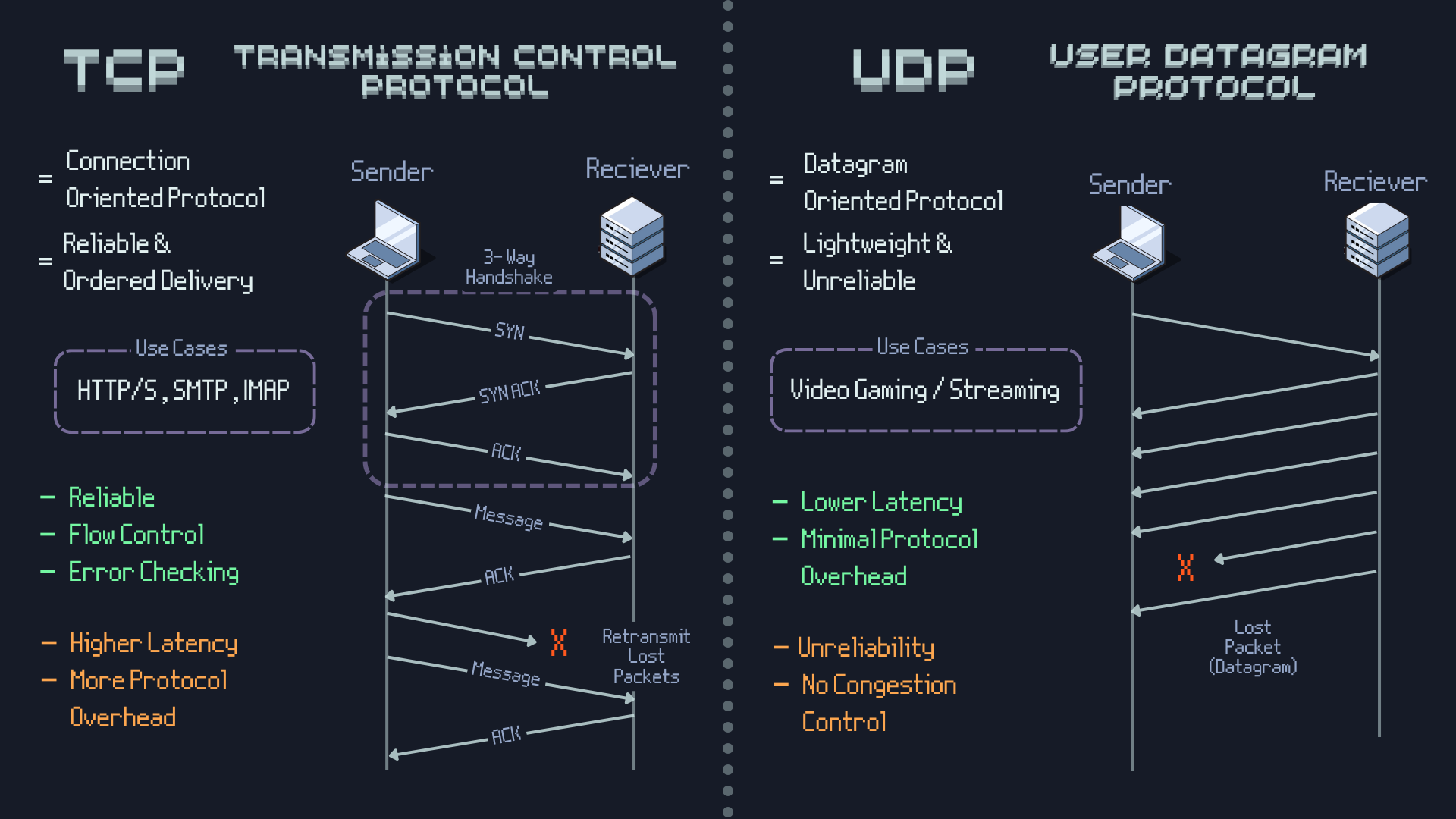
TCP Vs UDP
HTTPS
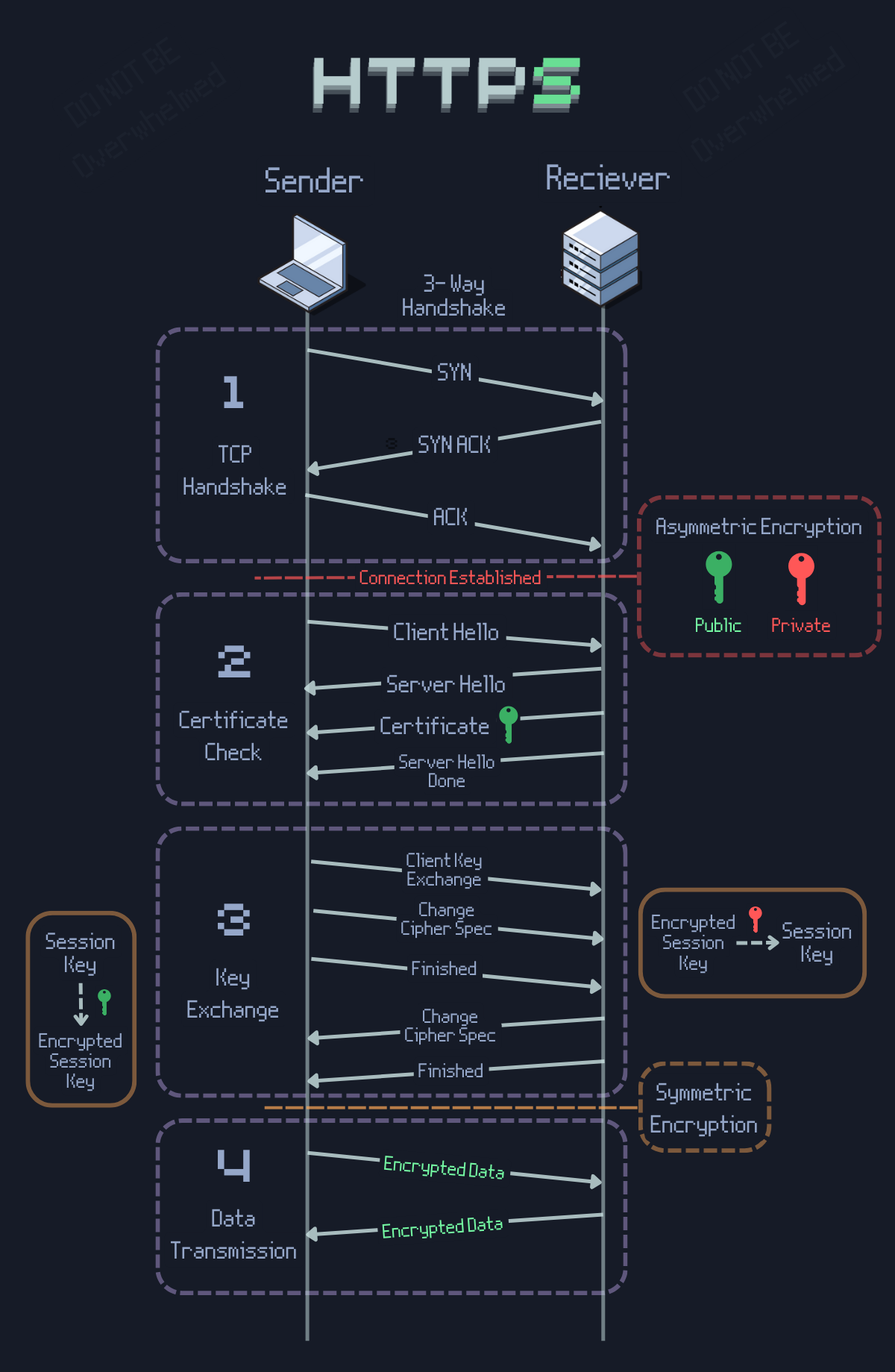
HTTPS has two extra steps included from normal http, as any person intercepting the network can read the data easily (Also Called as Man-In-The-Middle Attacks). The Two steps are:
- SSL Handshake: Client and server exchange encryption keys to secure the connection.
- Encrypted Communication: Data exchanged between client and server is encrypted using the exchanged keys.
This definitely improves the security but it doesnt make it 100% secure Ofcourse. if you can see session hijacking, phishing attacks etc are still possible even with HTTPS.
Forward Proxy VS Reverse Proxy
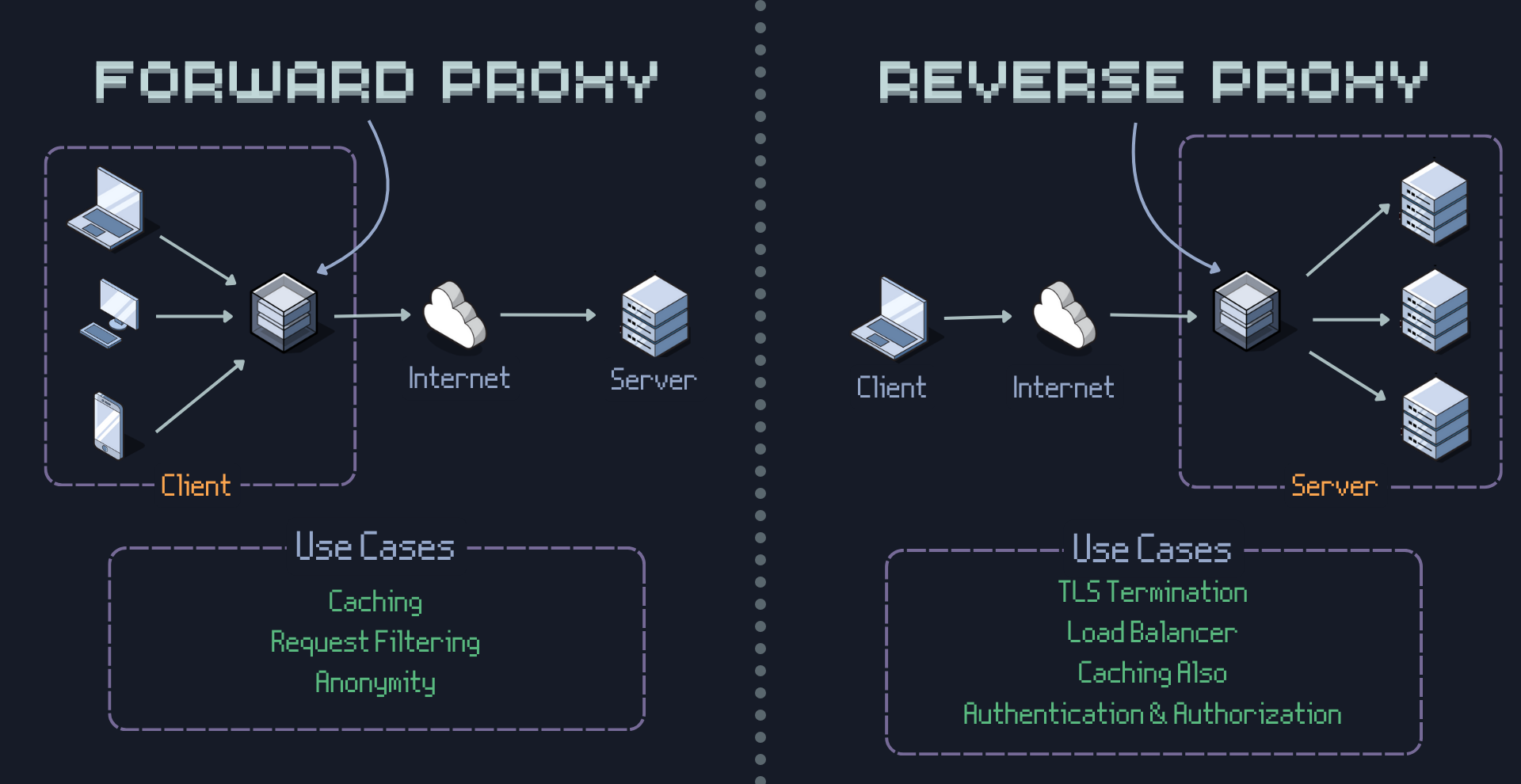
Forward proxy acts as intermediary for client requests to any server, providing anonymity and access control for internal users. Reverse proxy sits in front of servers, handling client requests by forwarding to appropriate server based on rules. It provides load balancing, SSL termination, and caching for improved performance. Both of these can be implemented using Nginx or Apache servers.
Reverse Proxy vs API Gateway vs Load Balancer
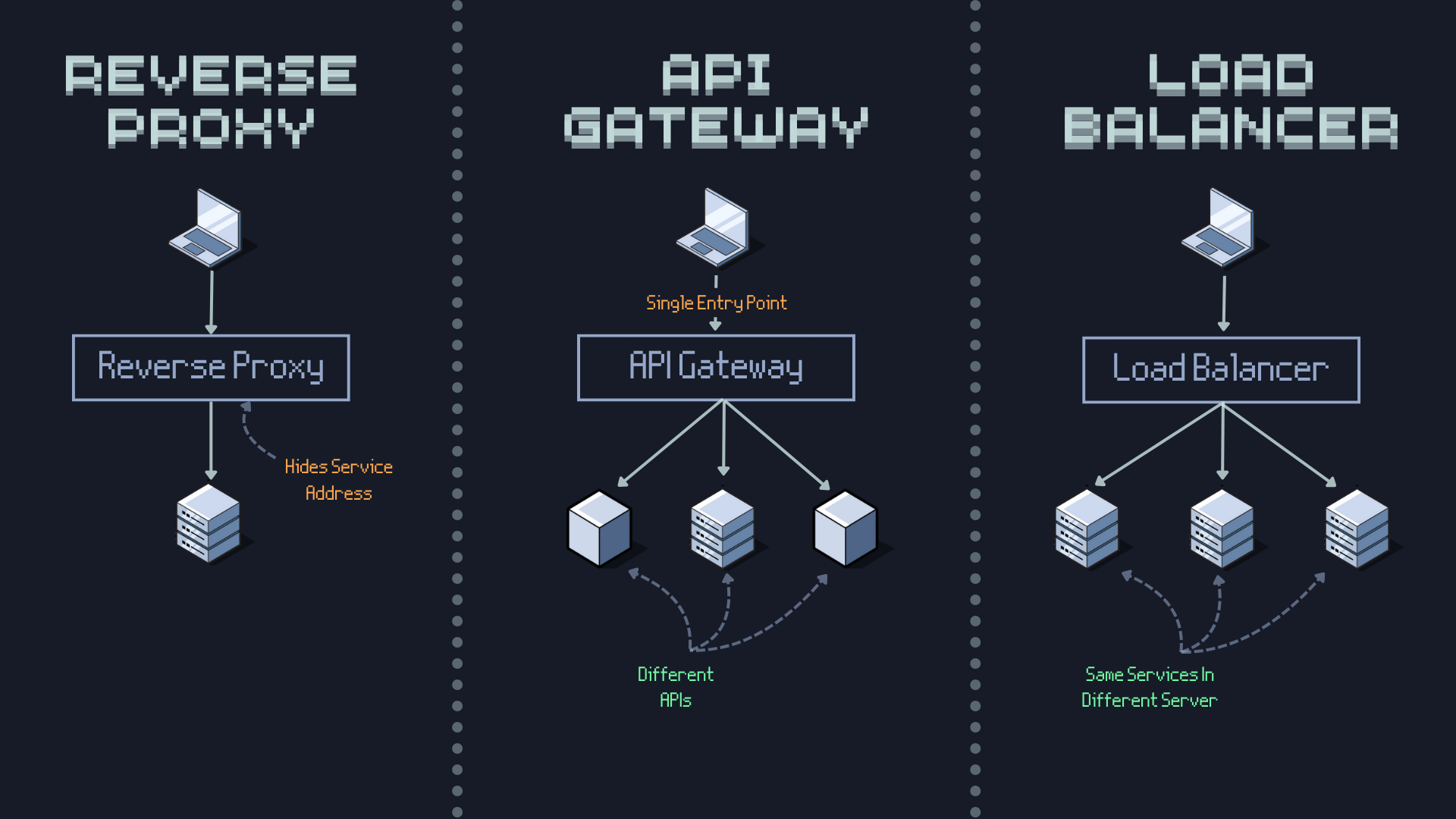
A Reverse Proxy primarily forwards client requests to backend servers, providing load balancing, SSL termination, and caching. An API Gateway is a specialized reverse proxy that manages API requests, offering features like request routing, rate limiting, authentication, and analytics. A Load Balancer distributes incoming network traffic across multiple servers to ensure high availability and reliability of applications. While all three can distribute traffic, the API Gateway focuses on API management, the Load Balancer on traffic distribution, and the Reverse Proxy on general request forwarding and optimization.
Polling, SSE & WebSockets
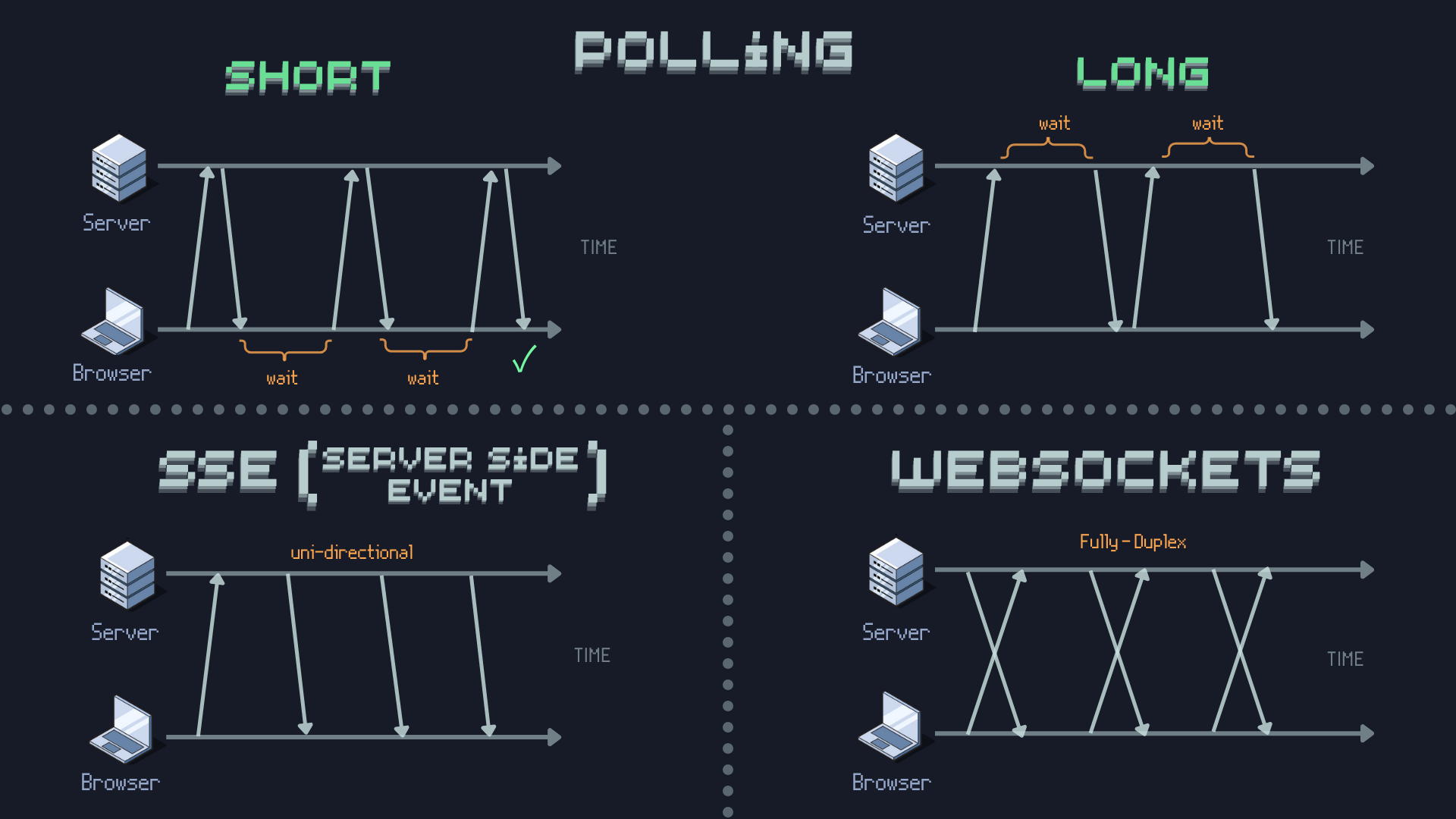
- Polling: Client periodically requests server for updates, leading to high traffic and latency.
- SSE (Server-Sent Events): Server pushes updates to client over a single HTTP connection, reducing latency.
- WebSockets: Full-duplex communication between client and server, enabling real-time interaction.
Real Life Use Cases:
- Polling: Suitable for infrequent updates, like checking for new emails.
- SSE: Ideal for live news feeds or stock price updates. Eg: F1 live scores, Esports leaderboards.
- WebSockets: Suitable for real-time chat applications, online gaming, and collaborative tools.
Resources
Ofcourse I will mention where i learnt from - ByteByteGo, Algomaster.io, Neo Kim's Newsletter, GeeksForGeeks are my go to source of information as of now, i will jump to github repos when we get advanced with system design.
PS: Thanks for reading it till the end!
these type of blogs take alot of time to make, because i am making sure i dont share invalid info and learning at the same time