AWS Bills and Serverless Thrills

It all started with a simple NextWork exercise - deploy a Java web app on EC2. Two hours of SSH struggles and Maven commands later, I had my first taste of AWS. But that was just the appetizer. What followed was a 7-day coding marathon that would transform me from an AWS newbie into someone who built a production-ready serverless billing platform called Squill.
This is the story of how a 2-hour EC2 exercise snowballed into a week-long AWS obsession - from "cd ~/Desktop/DevOps" to "serverless deploy --stage prod", from fumbling with .pem files to orchestrating Lambda functions, DynamoDB tables, and API Gateways like some sort of cloud wizard.
The Humble Beginning: EC2 and SSH Adventures
My AWS journey started with NextWork's simple exercise - deploying a Java web app on EC2. I launched an EC2 instance, fumbled with key pairs, and learned that SSH isn't just a fancy way to say "please let me in."
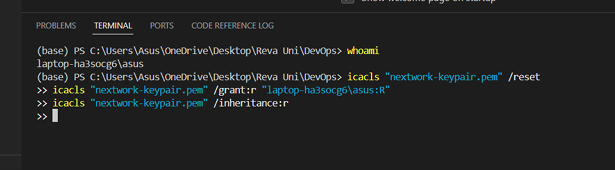
# First step - granting access to laptop user for key-pair format
icalcs "your-key.pem" /reset
icalcs "your-key.pem" /grant:R "your-laptop-id:R"
icalcs "your-key.pem" /inheritance:r
Using VS Code's Remote-SSH extension, I connected to my EC2 instance and created a Maven-generated Java web app. The project structure with src and webapp folders felt like magic - Maven had done all the heavy lifting!
Launching My First EC2 Instance: Virtual Computing Made Real
My AWS journey began with launching an EC2 (Elastic Compute Cloud) instance. Think of EC2 as your personal computer in the cloud - except it's more powerful, more reliable, and infinitely more scalable than any physical machine you could buy.
Why EC2?
I started this project by launching an EC2 instance because it would run our web app without the need for physical hardware. No more worrying about server maintenance, power outages, or hardware upgrades. EC2 gives you a virtual computer that's always available, always updated, and always ready to scale.
The Power of SSH
I also enabled SSH (Secure Shell) - a protocol that ensures only authorized users can access a remote server. When I connect to my EC2 instance, SSH verifies that I have the correct private key that matches the public key on the server. It's like having a digital lock and key system that's virtually unbreakable.
# Connecting to EC2 instance via SSH
ssh -i <my_pem_file_path> ec2-user@<public_ipv4_address>

# This command opens a secure tunnel to our cloud server
Understanding Key Pairs
A key pair is like having keys to your virtual computer. AWS holds the public key, and we keep the private key in our system as a .pem file. This asymmetric encryption ensures that even if someone intercepts our connection, they can't access our server without the private key.
Once I set up my key pair, AWS automatically downloaded a .pem file - this became my digital passport to the cloud.
VS Code: Bridging Local Development and Cloud Deployment
Visual Studio Code isn't just a code editor - it's a complete development environment that seamlessly connects local development with cloud deployment. Most developers know VS Code, but few realize its true power when combined with cloud services.
Remote Development Revolution
I installed the Remote-SSH extension, which is a game-changer provided by Microsoft. This extension allows me to connect my EC2 instance with VS Code, enabling its full IDE capabilities directly on the cloud server. Imagine having all the power of VS Code - IntelliSense, debugging, extensions - running on a cloud server!
# SSH Configuration for VS Code Remote Development
Host my-aws-server
HostName <public_ipv4_address>
User ec2-user
IdentityFile ~/path/to/my-key-pair.pem
Configuration details required to set up a remote connection include the Host & HostName (which points to our EC2 instance), the IdentityFile (which holds the directory of our .pem file), and User details (ec2-user for Amazon Linux instances).
Maven & Java: The Building Blocks of Enterprise Applications
No discussion of enterprise web development is complete without understanding the powerhouse duo of Maven and Java.
Apache Maven: The Build Automation Master
Apache Maven is a powerful tool that automates the building of software. But what does "building" mean here? It includes four critical components:
- Compiling - Converting source code into executable bytecode
- Linking - Connecting different code modules together
- Packaging - Bundling everything into deployable artifacts
- Testing - Running automated tests to ensure quality
Maven is required in this project because it helps us automate building the web app from raw code to the final deployable product. No more manual compilation steps or dependency management headaches!
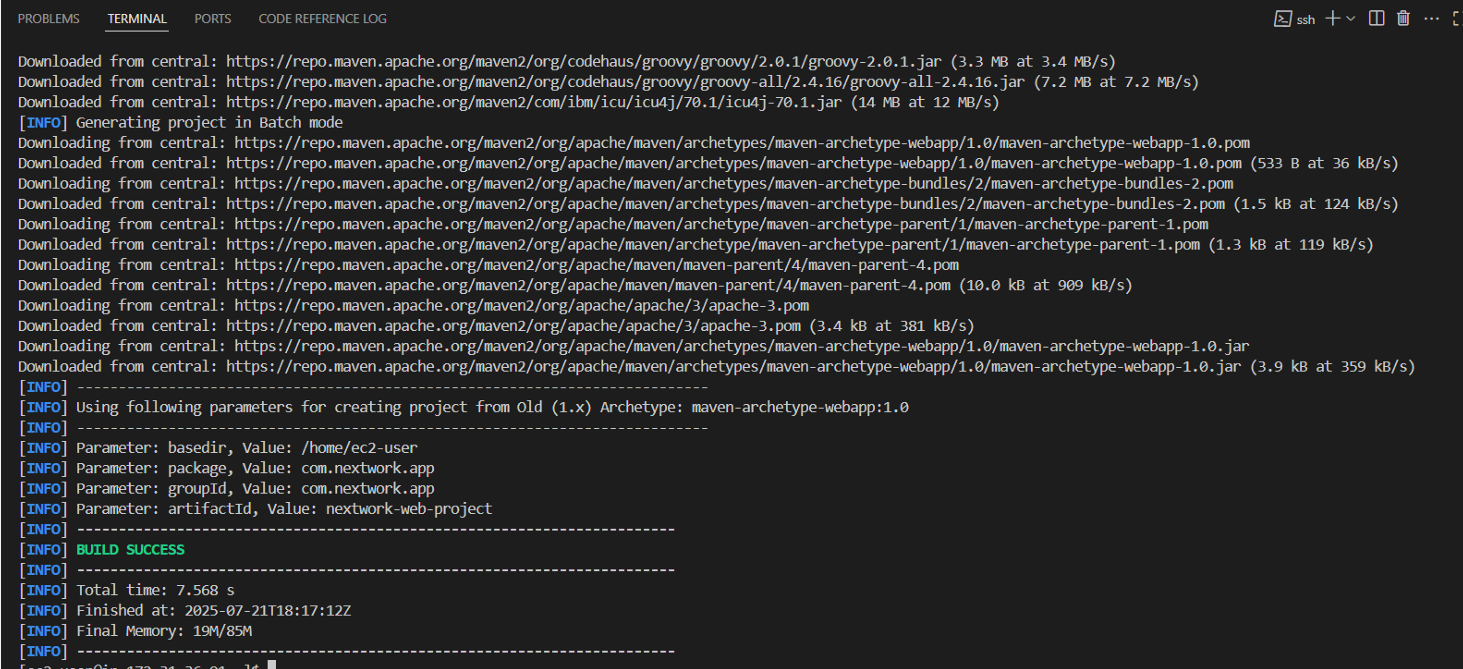
# Generating a Java web app with Maven
mvn archetype:generate \
-DgroupId=com.nextwork.webapp \
-DartifactId=nextwork \
-DarchetypeArtifactId=maven-archetype-webapp \
-DinteractiveMode=false
Java: The Enterprise Standard
Java is a popular programming language used to build different types of applications, from mobile apps to large enterprise systems. Java is required in this project because we're using this programming language for building our web app. Its "write once, run anywhere" philosophy makes it perfect for cloud deployment.
Creating the Application: From Code to Cloud
Using VS Code's file explorer, I could see the nextwork project file that was created via Maven. The beauty of Maven is in its standardized project structure - every Java developer knows exactly where to find what they need.
Project Structure Deep Dive
Two of the project folders created by Maven are src and webapp, which contain the source code files that define how the web app looks and works. This isn't just organization for organization's sake - it's a battle-tested structure used by millions of Java applications worldwide.
// Project structure created by Maven
nextwork/
├── src/
│   └── main/
│       └── webapp/
│           └── index.jsp
├── target/
└── pom.xml
The Magic of JSP
index.jsp is a file used in Java web apps. It's similar to an HTML file because it contains markup to display web pages. However, index.jsp can also include Java code, which lets it generate dynamic content. This means our web pages can change based on user input, database queries, or any other logic we want to implement.
I edited index.jsp via VS Code's Remote-SSH connection, seamlessly working on cloud-hosted code as if it were on my local machine. This is the power of modern development tools - the boundary between local and cloud development has completely disappeared.
<!-- Sample JSP content with dynamic Java code -->
<%@ page language="java" contentType="text/html; charset=UTF-8" %>
<html>
<body>
<h1>Welcome to NextWork!</h1>
<p>Current time: <%= new java.util.Date() %></p>
</body>
</html>
Understanding IPv4 and Network Fundamentals
A server's IPv4 DNS is the public address for the server that is used by the internet to access the server. Think of it as the postal address of your cloud server - without it, no one can find your application on the vast internet.
When I connected to my EC2 instance, I needed this IPv4 address to establish the SSH connection. It's the bridge between my local development environment and the cloud infrastructure.
The Main Course: A 7-Day Serverless Feast
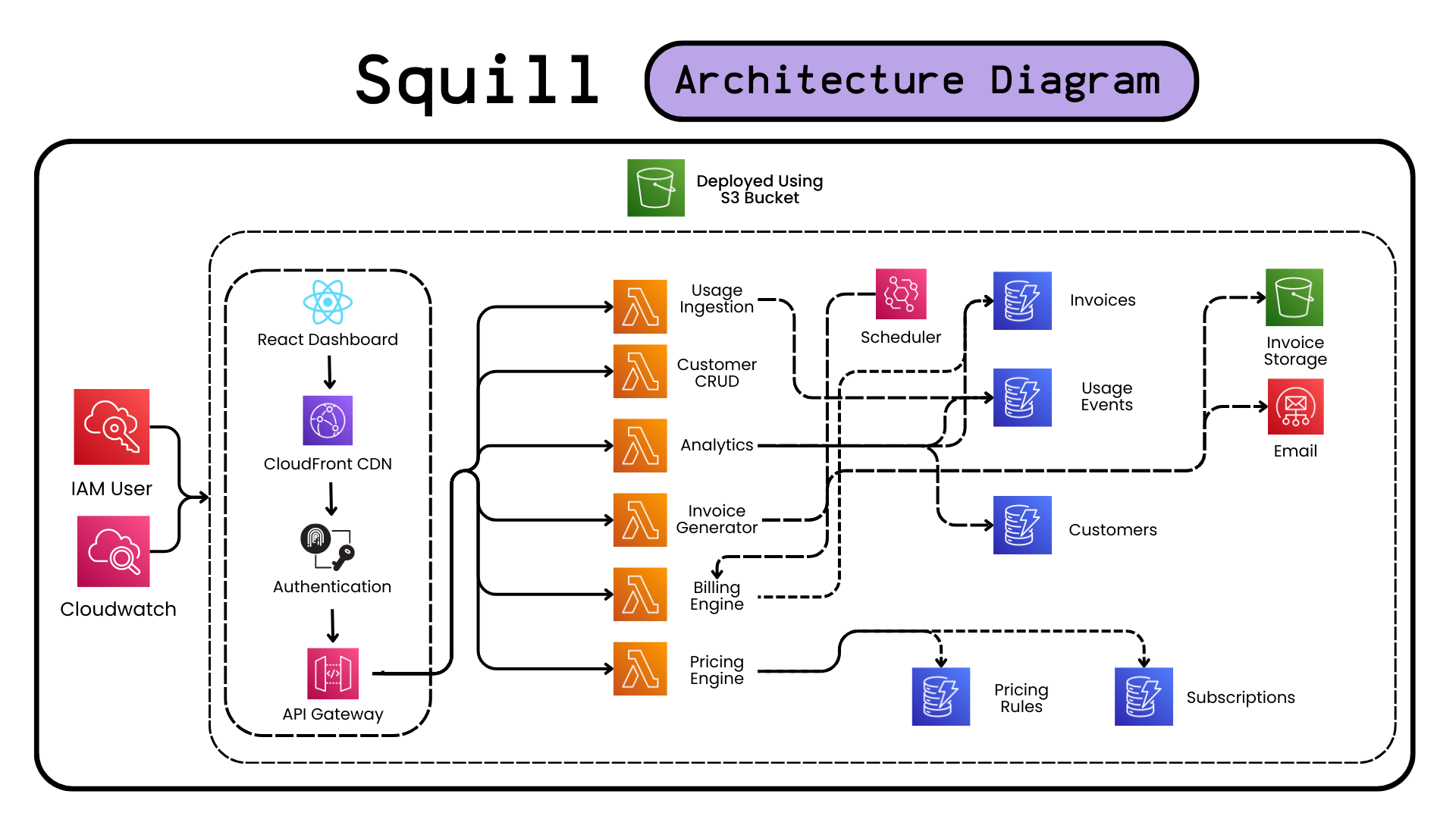
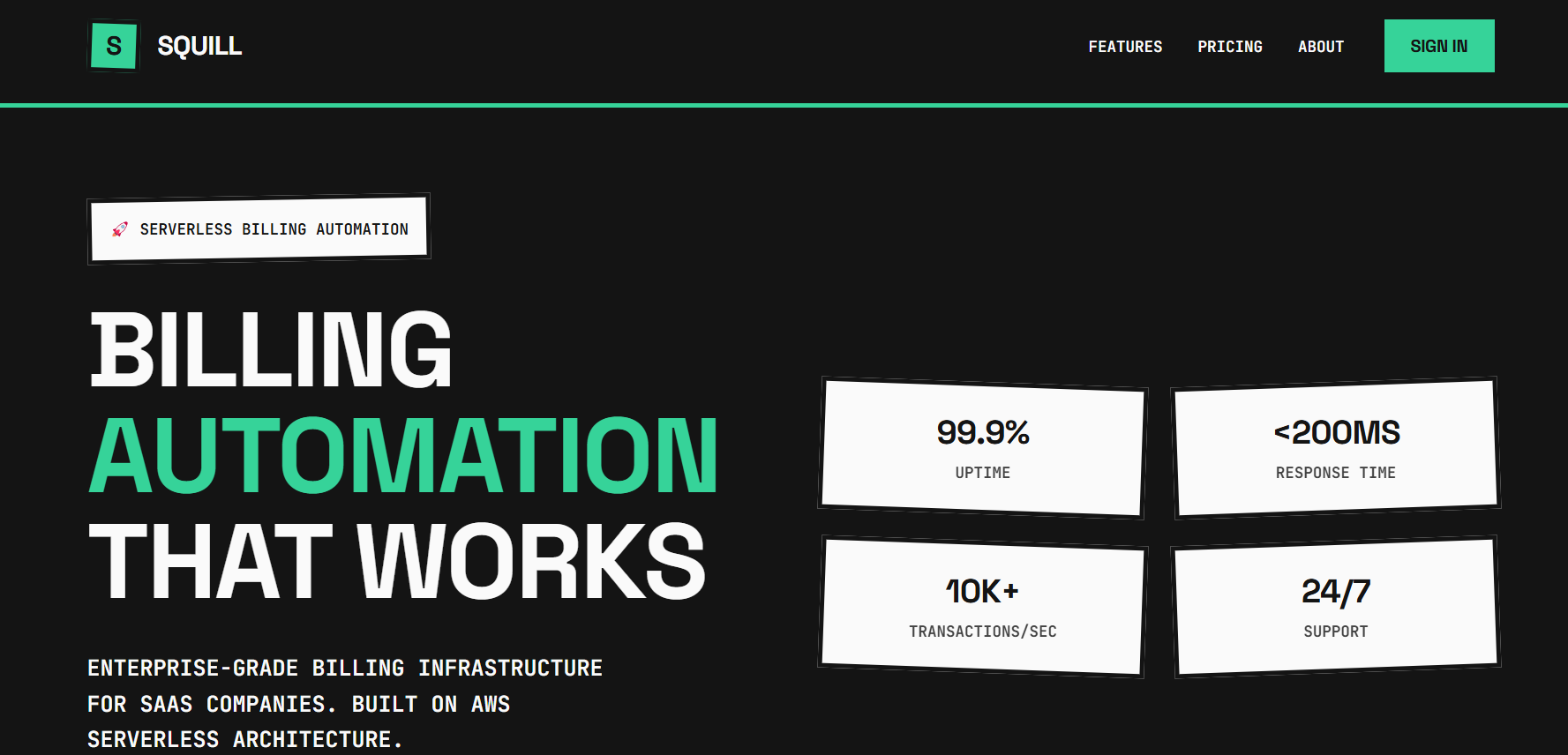
Little did I know, this 2-hour exercise was just the appetizer. The main course? A 7-day serverless feast called Squill i.e a Billing Automation Platform.
Squill Day 1: Foundation Chaos - "Why Won't Serverless Deploy?"
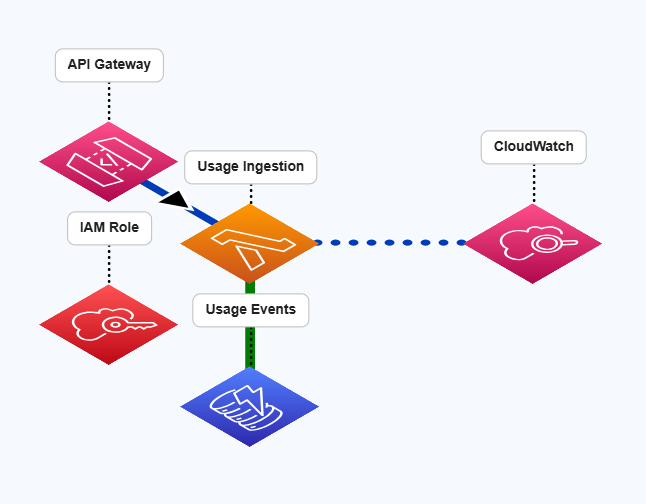
Armed with newfound EC2 confidence, I dove into building Squill. Squill Day 1 was supposed to be simple: set up serverless framework and deploy a basic API. Reality had other plans.
# The commands that should have worked
npm install -g serverless
serverless deploy

# What actually happened
Error: frameworkVersion (3) doesn't match installed version (4.18.1)
Error: python3.13 not supported by AWS Lambda
Error: NoCredentialsError: Unable to locate credentials
After wrestling with Python versions, AWS credentials, and serverless configurations, I finally got my first Lambda function deployed. The usage ingestion API was born!
# Victory! First working Lambda
def ingest_usage(event, context):
body = json.loads(event['body'])
usage_event = {
'customer_id': body['customer_id'],
'timestamp': datetime.utcnow().isoformat(),
'event_type': body['event_type'],
'quantity': Decimal(str(body['quantity']))
}
usage_table.put_item(Item=usage_event)
Squill Day 2-3: Customer Management and Pricing Madness
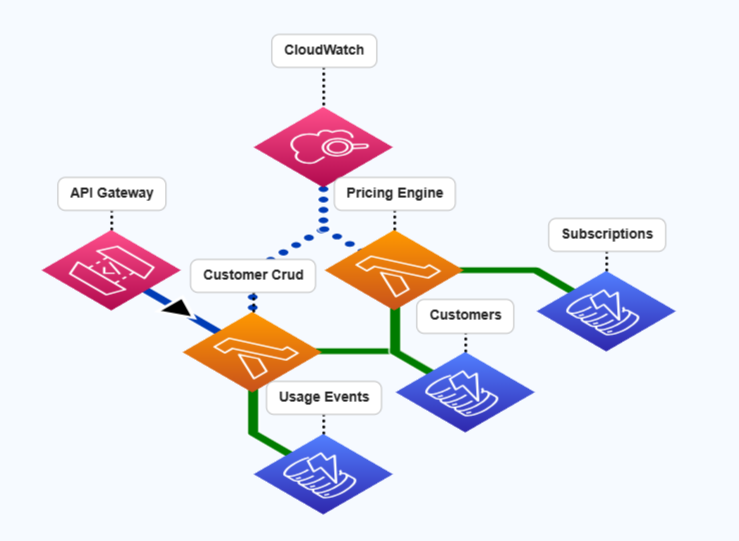
Squill Day 2 brought CRUD operations for customer management. Sounds simple, right? Wrong! DynamoDB doesn't like reserved keywords, and I learned this the hard way.
# The error that haunted me
ValidationException: Invalid UpdateExpression: Attribute name is a reserved keyword

# The solution: ExpressionAttributeNames
update_params = {
'UpdateExpression': 'SET #name = :name, email = :email',
'ExpressionAttributeNames': { '#name': 'name' },
'ExpressionAttributeValues': { ':name': new_name, ':email': new_email }
}
Squill Day 3 was pricing engine day. I built a dual pricing system - Squill charges client companies, and client companies charge their customers. It's like billing inception!
# Squill's subscription tiers
SUBSCRIPTION_TIERS = {
'basic': {
'monthly_fee': Decimal('99.00'),
'limits': { 'customers': 1000, 'api_calls': 10000 }
},
'pro': {
'monthly_fee': Decimal('299.00'),
'limits': { 'customers': 10000, 'api_calls': 100000 }
}
}
Squill Day 4: Automation Nightmares and EventBridge Magic
Squill Day 4 was all about automation - EventBridge scheduling, invoice generation, and SES email delivery. This is where things got really interesting (and by interesting, I mean frustrating).
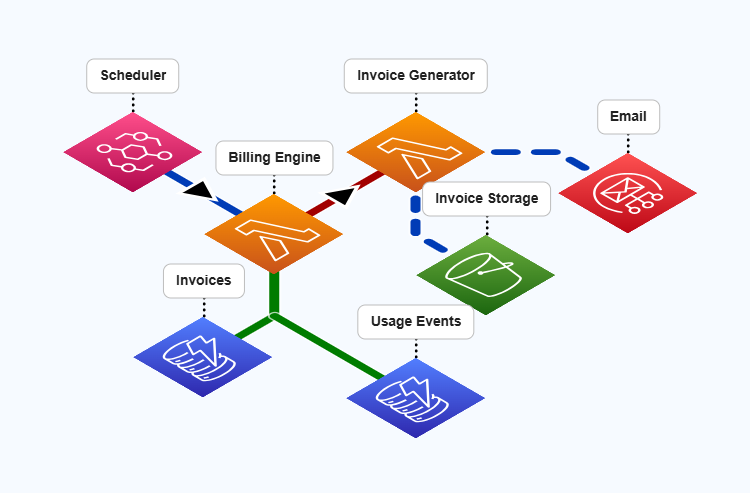
# EventBridge cron that actually works
events:
- schedule:
rate: cron(0 9 1 * ? *)  # 9 AM on 1st of every month
input:
action: "generate_monthly_bills"
The invoice generation logic was a beast - calculating usage aggregations, applying tiered pricing, and generating PDF invoices. My favorite bug? Forgetting to convert Decimal to float for JSON serialization!
# The bug that cost me 2 hours
TypeError: Object of type Decimal is not JSON serializable

# The fix
return {
'statusCode': 200,
'body': json.dumps(invoice_data, default=str)
}
Squill Day 5-6: React Dashboard and Integration Test Hell
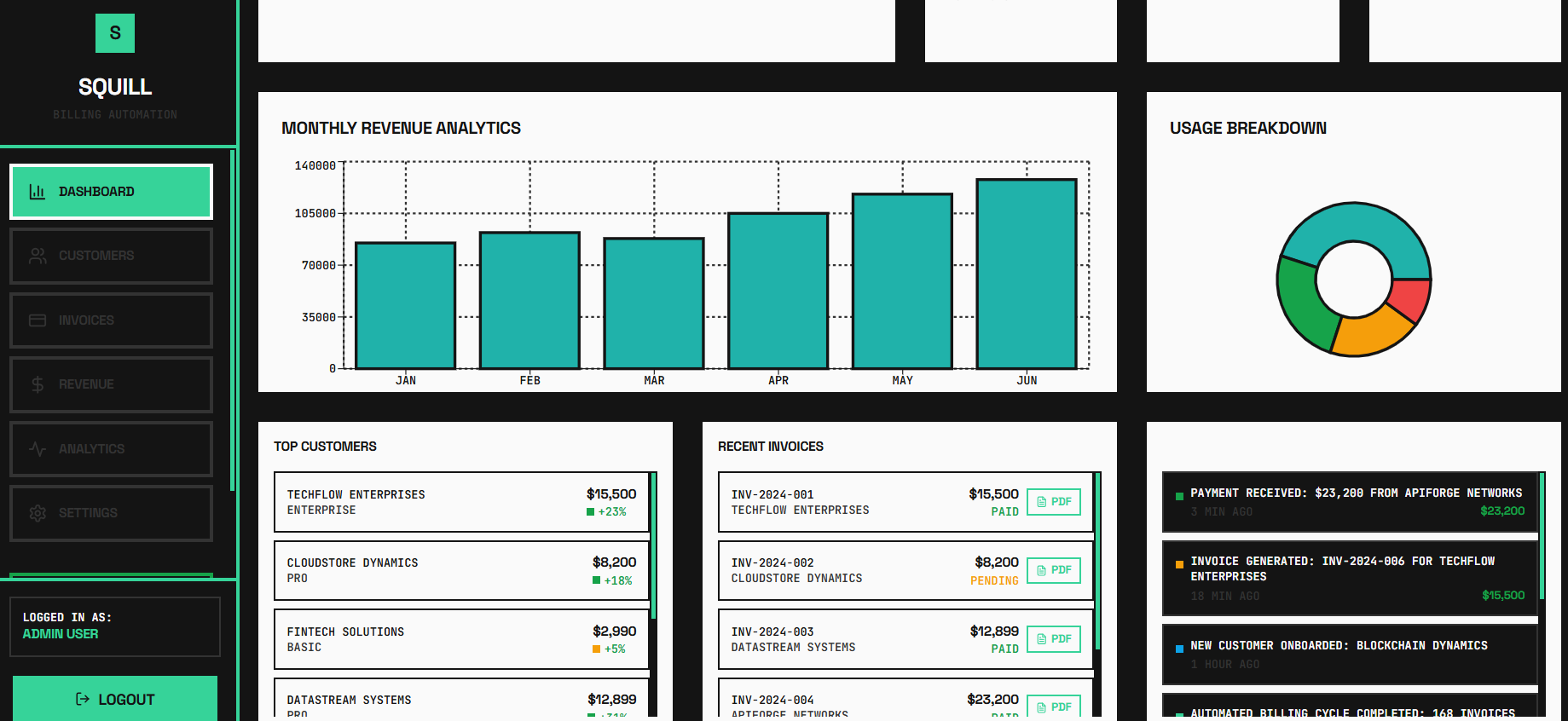
Squill Day 5 brought the React dashboard - charts, analytics, and a beautiful purple theme. But Squill Day 6... Squill Day 6 was integration test hell. Tests failing left and right due to duplicate data and race conditions.
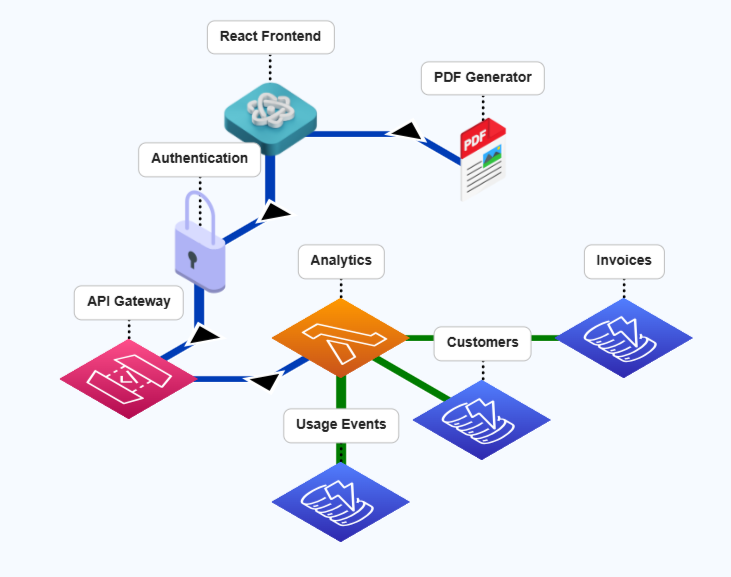
# React dashboard with Recharts magic
const RevenueChart = () => (
<ResponsiveContainer width="100%" height="100%">
<LineChart data={monthlyRevenue}>
<Line dataKey="revenue" stroke="hsl(var(--primary))" />
</LineChart>
</ResponsiveContainer>
);
The integration tests were a nightmare until I added unique identifiers and proper test isolation:
# Test isolation salvation
customer_id = f"test-customer-{int(time.time())}-{random.randint(1000, 9999)}"

# Finally, all 7 tests passing!
Squill Day 7: Production Deploy and "Holy Crap, It Works!"
Squill Day 7 was deployment day. CloudFront setup, monitoring dashboards, and the moment of truth - does this thing actually work in production?
# The final deployment commands
serverless deploy --stage prod
npm run build
aws s3 sync build/ s3://squill-frontend-bucket

# Testing the live API
curl -X POST https://yorandomgibberish.execute-api.us-east-1.amazonaws.com/dev/customers \
-H "Content-Type: application/json" \
-d '{"customer_id":"test-123","name":"Test Corp"}'

# Response: 201 Created!
The Final Architecture
- 12 Lambda functions handling different operations
- 5 DynamoDB tables with proper relationships
- API Gateway with CORS and validation
- EventBridge for automated billing cycles
- S3 + SES for invoice storage and delivery
- React dashboard with real-time analytics
Conclusion: From SSH Struggles to Serverless Success
My AWS journey started with me frantically typing "cd ~/Desktop/DevOps" and wondering why my SSH key wouldn't work. Seven days later, I had built Squill - a production-ready serverless billing platform that handles real API requests and generates actual invoices!
The evolution from that 2-hour EC2 exercise to Squill's serverless architecture taught me that AWS isn't just about infrastructure - it's about possibilities. You start with one EC2 instance and end up orchestrating a symphony of Lambda functions, DynamoDB tables, and API Gateways.
The mistakes were part of the journey - from Python version conflicts to DynamoDB reserved keywords, from Decimal serialization bugs to integration test failures. Each error taught me something new about AWS and made the final success even sweeter.
Squill now handles:
- Real-time usage tracking across multiple clients
- Automated tiered pricing calculations
- Monthly billing cycles with EventBridge
- PDF invoice generation and email delivery
- Interactive React dashboard with analytics
- Multi-tenant SaaS architecture
So, "AWS Bills and Serverless Thrills?" Absolutely! From fumbling with SSH permissions to deploying production SaaS platforms, AWS has been the enabler of this incredible journey. The cloud isn't just the future - it's the present, and it's absolutely thrilling to build in it!
PS: Reflections on the AWS Learning Experience
Looking back at this 7-day AWS adventure, from that first "Permission denied" SSH error to seeing Squill handle live API requests, I'm amazed at how much you can accomplish when you embrace the serverless mindset. You start thinking about servers and end up thinking about events, functions, and data flows.
The 2-hour EC2 exercise was the perfect foundation - it taught me the basics of cloud infrastructure without the complexity. But Squill showed me the real AWS magic: building enterprise-grade applications by combining Lambda, DynamoDB, API Gateway, EventBridge, and more into a cohesive system.
For anyone starting their AWS journey, my advice is: start with the basics (EC2, SSH, simple deployments), but don't be afraid to dream big. The platform's true power emerges when you stop thinking about individual services and start thinking about architectures. And yes, definitely keep an eye on your AWS billing dashboard - serverless scales beautifully, but so do the costs!
From NextWork's Maven web app to Squill's production SaaS platform, this journey proves that with AWS, the only limit is your imagination (and maybe your credit card limit). Next adventure: maybe a serverless platform that predicts and optimizes its own AWS costs? The possibilities are endless in the cloud!